AWS MGN 서비스
1. AWS MGN(AWS Application Migration Service) 는 무엇인가?
AWS MGN은 리호스팅(Rehosting) 전략의 마이그레이션 서비스입니다.
AWS 클라우드 환경으로의 리프트 앤 시프트(Lift & Shift) 즉, 레거시 환경(온프레미스 서버)을 클라우드 환경으로 변경하는 전략에 사용되는 서비스입니다.
What Is AWS Application Migration Service? - Application Migration Service
What Is AWS Application Migration Service? - Application Migration Service
What Is AWS Application Migration Service? AWS Application Migration Service (MGN) is a highly automated lift-and-shift (rehost) solution that simplifies, expedites, and reduces the cost of migrating applications to AWS. It allows companies to lift-and-shi
docs.aws.amazon.com
2. AWS MGN 과 CloudEndure Migration 비교
해당 서비스 이전에 CloudEndure Migration 라는 솔루션을 사용하였지만 2019년 ******AWS가 CloudEndure를 인수하면서 AWS Application Migration Service 영향으로 EOL(판매 종료) 결정되었습니다.
CloudEndure Migration의 EOL(End of Life)에 따라 비교를 할 필요가 없게 되었습니다.
💡2024년 3월 31일 - AWS 중국 리전 및 AWS GovCloud(미국) 리전, AMS 고객 및 Outposts를 제외한 모든 AWS 리전에서 CEDR이 중단됩니다.
https://docs.cloudendure.com/#Configuring_and_Running_Migration/Migration_EOL/Migration_EOL.htm
Your search for returned result(s).
docs.cloudendure.com
3. AWS MGN 지원 리전
대부분의 리전에서 서비스 이용 가능합니다.
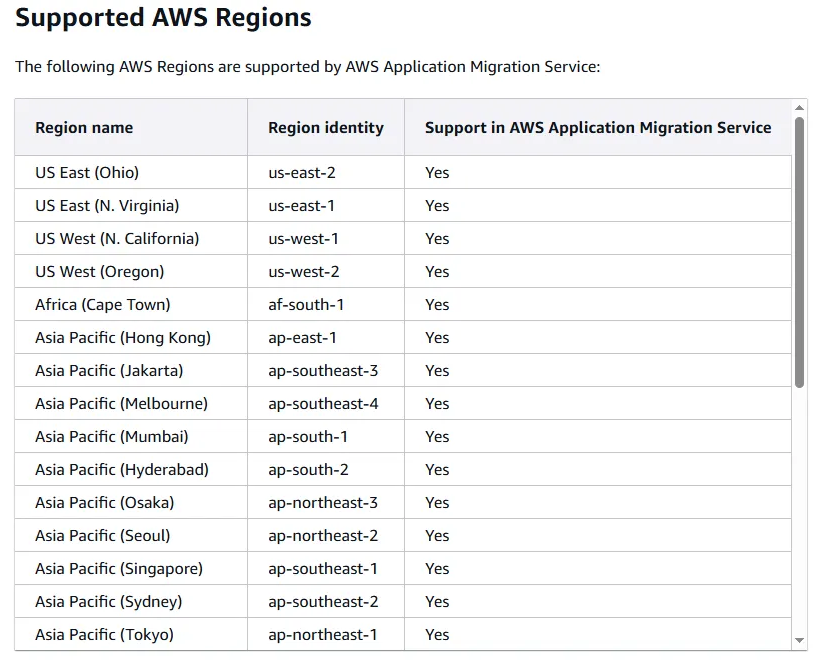
What Is AWS Application Migration Service? - Application Migration Service
What Is AWS Application Migration Service? - Application Migration Service
What Is AWS Application Migration Service? AWS Application Migration Service (MGN) is a highly automated lift-and-shift (rehost) solution that simplifies, expedites, and reduces the cost of migrating applications to AWS. It allows companies to lift-and-shi
docs.aws.amazon.com
4. AWS MGN 지원 운영체제
- VMWare의 I/O 장치 반가상화와 같이 부분적 반가상화는 가능하지만, 완전한 반가상화된 소스 서버를 지원하지 않습니다.
- x86 아키텍처로 구축된 운영 체제만 지원합니다.
4-1. Windows(윈도우)
- Windows
- Microsoft Windows Server 2022 64-bit
- Microsoft Windows Server 2019 64-bit
- Microsoft Windows Server 2016 64-bit
- Microsoft Windows 10 64-bit
- EOL Windows
- Microsoft Windows Server 2012 R2 64-bit
- Microsoft Windows Server 2012 64-bit
- Microsoft Windows Server 2008 R2 64-bit (patched)
- Microsoft Windows Server 2008 64-bit
- Microsoft Windows Server 2008 32-bit
- Microsoft Windows Server 2003 R2 64-bit
- Microsoft Windows Server 2003 R2 32-bit
- Microsoft Windows Server 2003 64-bit
- Microsoft Windows Server 2003 32-bit
💡2025년 5월 15일부터 Microsoft Windows Server 2003 버전에 Replication Agent 설치 불가
- 윈도우 마이그레이션 검토사항
- 윈도우 업데이트 권장
- 최소 2 GB 이상의 디스크 여유 공간
- WMI 서비스 활성화
- Windows Server 2008 R2 이후 버전에는 .NET Framework 4.5 이상의 설치 필요
- Windows 10의 경우, 자동 절전 모드 비활성화(데이터 복제 중단 방지)
- 마운트 포인트는 인식할 수 있는 드라이브 문자 지정 </aside>
Supported operating systems - Application Migration Service
Operating systems supported by Application Migration Service - Application Migration Service
Operating systems supported by Application Migration Service AWS Application Migration Service supports replication of physical, virtual or cloud-based source servers for multiple versions of Window and Linux operating systems. Supported Windows operating
docs.aws.amazon.com
4-2. Linux(리눅스)
- Amazon Linux (AL) 1, 2, and 2023
- CentOS 5.5 to 7.9
- Debian Linux 8 to 11
- Oracle Linux (OL) 6.0 to 7.0 (Unbreakable Enterprise Kernel Release 3 이상 또는 Red Hat compatible Kernel 만 실행)
- Oracle Linux (OL) 8.5 to 8.9 (Unbreakable Enterprise Kernel Release 6 또는 Red Hat Compatible Kernel 만 실행)
- UEK kernels 참조
- 5.15.0-200.131.27.el8uek.x86_64
- 5.15.0-101.103.2.1.el8uek.x86_64
- 5.15.0-3.60.5.1.el8uek.x86_64
- 5.4.17–2136.314.6.3.el8uek.x86_64
- 5.4.17–2136.307.3.1.el8uek.x86_64
- 5.4.17–2136.300.7.el8uek.x86_64
- UEK kernels 참조
- Oracle Linux (OL) 9.0 ~ 9.4 (Unbreakable Enterprise Kernel Release 7 또는 Red Hat Compatible Kernel 만 실행)
- Red Hat Enterprise Linux (RHEL) 5.5 ~ 9.5
- Rocky Linux 8 ~ 9
- SUSE Linux Enterprise Server 11 SP4 ~ 15 SP5
- Ubuntu LTS 12.04 ~ 24.04
💡2025년 4월 1일부터 Red Hat Enterprise Linux(RHEL) 와 CentOS 버전 5에 Replication Agent 설치 불가
- 리눅스 마이그레이션 검토사항
- Python 설치(버전 2.4 이상, 3.0 이상)
- Linux 커널 버전 6.8까지 지원
- GRUB 부트로더 사용 가능 여부(사용 가능한 서버만 지원)
- 64 Bit 아키텍처 확인(32 Bit는 미지원)
- Red Hat Enterprise Linux(RHEL)의 경우, Cloud Access (BYOL) licenses 필요
- Red Hat Enterprise Linux(RHEL) Pay as You Go(PAYG) 이미지의 경우, AWS에서 제공하는 RHEL AMI를 선택 필요
- 커널 버전 확인(Debian/Ubuntu는 커널 3.x 이상만 지원)
- Azure의 Ubuntu 서버는 커널을 표준 커널이나 AWS에서 조정한 Ubuntu 커널 'linux-aws'로 전환 필요(Azure 커널은 Amazon EC2 호환 불가)
Supported operating systems - Application Migration Service
Operating systems supported by Application Migration Service - Application Migration Service
Operating systems supported by Application Migration Service AWS Application Migration Service supports replication of physical, virtual or cloud-based source servers for multiple versions of Window and Linux operating systems. Supported Windows operating
docs.aws.amazon.com
5. AWS Replication Agent 를 활용한 마이그레이션
💡vCenter 환경의 경우에는 Agent 와 Agentless 두 가지 마이그레이션 방식이 존재합니다.

Agent 방식과 Agentless 방식의 차이는 아래와 같습니다.
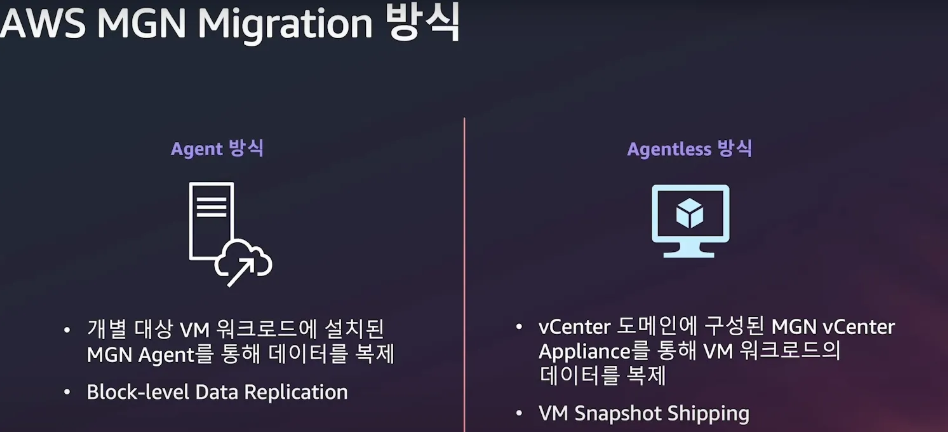
VMware 워크로드의 AWS 클라우드 마이그레이션을 위한 완벽 가이드
Agentless 방식은 ****Application Migration Service vCenter Client를 설치하면 모든 시스템에 에이전트를 설치할 필요 없이 마이그레이션이 가능합니다.
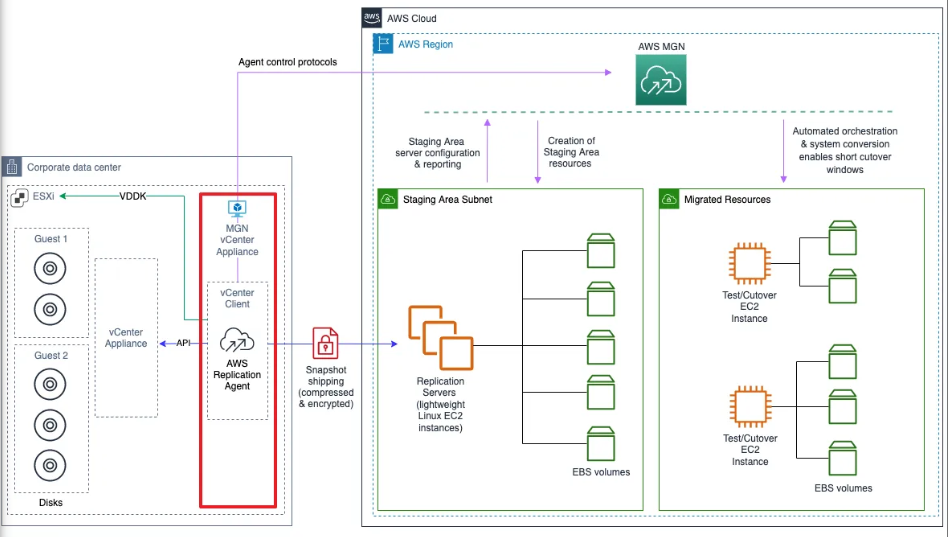
Agentless replication overview - Application Migration Service
Agentless replication overview - Application Migration Service
Agentless replication overview Agentless snapshot-based replication allows you to replicate source servers on your vCenter environment into AWS without installing the AWS Replication Agent. In order to use agentless replication, you must dedicate at least
docs.aws.amazon.com
5-1. Replication Agent 역할
Replication Agent는 시스템(서버)에 연결된 모든 볼륨 데이터를 **블록 단위(Block-Level)**로 읽으며, 복제 서버에 복제합니다. 이후의 변경 사항은 실시간으로 복제 서버에 동기화하며 RPO(Recovery Point Objective)=0 에 가깝게 실시간성으로 데이터를 복제합니다.
Agent related - Application Migration Service
Agent related - Application Migration Service
For Linux, no-rescan on reboot is supported only on environments that use initramfs.
docs.aws.amazon.com
5-2. Replication Agent 과 AWS MGN(서비스)간 상호작용
- Replication Agent가 Source Server에서 수집하는 데이터 목록
- Host Name & ID
- CPU 모델 및 코어 수
- Memory 사이즈
- H/W 및 OS 정보
- Disk 개수 및 용량
- Private IP 주소
- Replication Agent를 통해 서비스로 전송되는 데이터 목록
- Replication Agent 메트릭 정보
- Source Server 복제 상태(started, stalled, resumed 등)
- 백로그(Backlog) 정보
- H/W 및 OS 정보
Agent related - Application Migration Service
Agent related - Application Migration Service
For Linux, no-rescan on reboot is supported only on environments that use initramfs.
docs.aws.amazon.com
5-3. Replication Agent 설정(Source 서버와 서비스 사이 Proxy 구성 시)
[설정 형식]
https_proxy=https://PROXY:PORT/

[설정 예시]
https_proxy=https://10.0.0.1:8088/
Agent related - Application Migration Service
Agent related - Application Migration Service
For Linux, no-rescan on reboot is supported only on environments that use initramfs.
docs.aws.amazon.com
5-4. Replication Agent Public 네트워크 통신
TCP 443 포트를 사용하여 MGN 서비스의 Service Manager와 통신하고, TCP 1500 포트를 사용하여 복제할 데이터를 전송합니다.

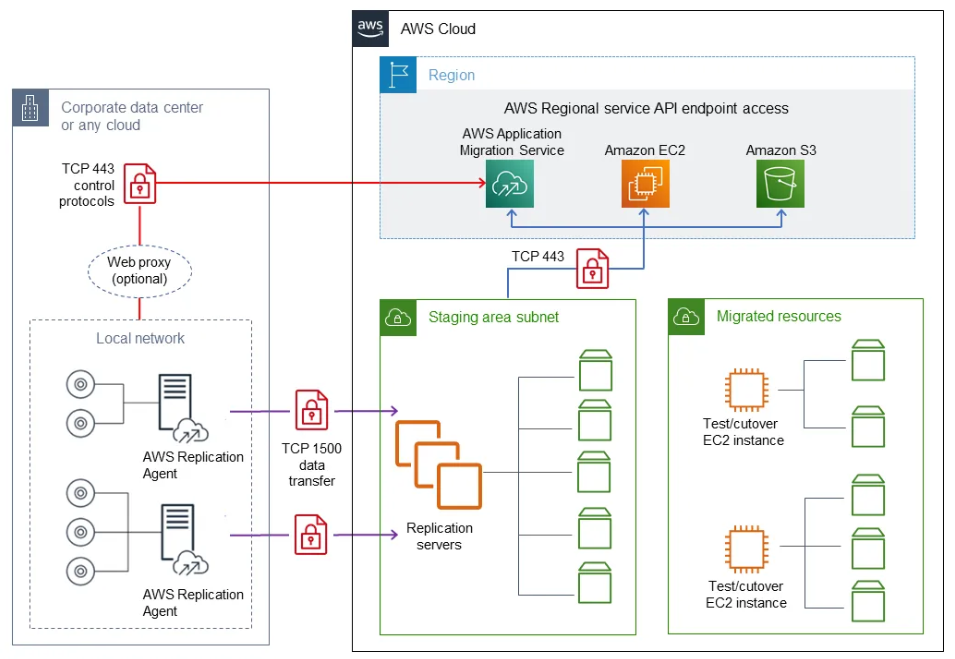
Agent related - Application Migration Service
Agent related - Application Migration Service
For Linux, no-rescan on reboot is supported only on environments that use initramfs.
docs.aws.amazon.com
5-4. Replication Agent Private 네트워크 통신
프라이빗 환경에서 마이그레이션을 진행할 경우, 에이전트가 MGN 서비스(Control Plane)와 PrivateLink를 통한 연결을 위해 몇가지 엔드포인트 생성이 필요합니다.
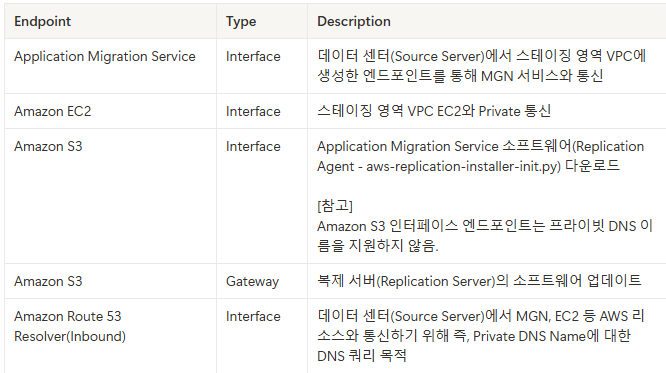
각 시스템 및 서비스별 통신 정보는 아래와 같습니다.


프라이빗 네트워크를 통해 Application Migration Service 데이터 및 컨트롤 플레인에 연결 - 권장 가이드
'Cloud > AWS' 카테고리의 다른 글
| AWS Migration Hub 서비스 정리 (0) | 2025.08.03 |
|---|---|
| AWS - 리소스 탐색기(Resource Explorer) (0) | 2025.03.11 |
| AWS - Bedrock/Kendra/Chatbot 서비스를 활용한 ChatOps 구성 (2) | 2025.03.07 |
| AWS - 폐쇄망 환경 EC2 커널 업데이트 (0) | 2025.02.24 |
| AWS - Amazon EC2(Elastic Compute Cloud) 생성 (0) | 2022.10.14 |